How to Build a Micro-Storefront for Shopify
Step-by-step guide to building campaign-specific micro-storefronts on Shopify. Cut wasted ad spend and boost conversions with focused shopping funnels.
You're spending thousands on Shopify ads. Your click-through rates look healthy. But your conversion rate sits somewhere around 1.6% — the global ecommerce average.
The problem isn't the ads. It's where the clicks land.
Generic product pages weren't designed for campaign traffic. They're built for browsers — full navigation, site-wide promos, a dozen exit points. A shopper who just tapped your TikTok ad for a specific product doesn't want to browse your entire catalogue. They want that product, in their size, with a fast checkout.
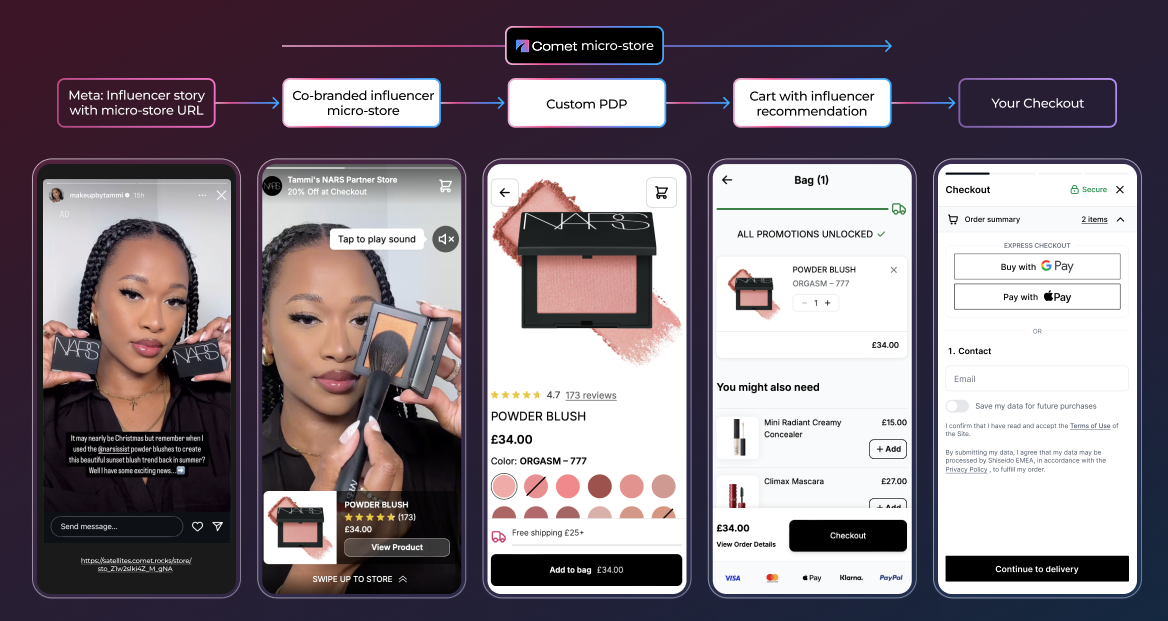
Micro-storefronts solve this. They're campaign-specific shopping funnels that replace the generic PDP as your post-click destination — and they convert significantly better.
This guide walks you through building your first micro-storefront on Shopify, step by step.
Why Your Shopify Store Needs Micro-Storefronts
The numbers tell the story. Baymard Institute puts the average cart abandonment rate at 70.22% across 50 studies. That's seven out of ten shoppers who add something to their cart and still don't buy.
Much of that drop-off happens because the shopping experience doesn't match the intent. A shopper clicks an ad for running shoes and lands on a page with navigation menus, unrelated product recommendations, and a checkout flow that sends them to a completely different context.
Micro-storefronts fix this by giving each campaign its own focused experience:
- Curated products that match the ad creative or influencer narrative
- No navigation distractions — one path from landing to Shopify checkout
- Campaign-specific offers like bundles, discounts, or free shipping
- Your existing Shopify checkout — Shop Pay, Apple Pay, discount codes, fulfilment — all inherited
- Full attribution tracking every sale back to its source
The result? Shopify brands using micro-storefronts consistently see conversion rates that put them in the top 10% of stores — the ones converting at 4.7% or higher. Optimising your CVR becomes much easier when the shopping experience matches the intent.
What You Need Before You Start
Building a micro-storefront on Shopify requires:
- An active Shopify store with products in your catalogue
- A Comet account — start a free trial or install from the Shopify App Store
- A campaign or use case in mind — which products, which audience, which channel
That's it. No developer, no designer, no custom theme work. Comet connects directly to your Shopify catalogue and syncs products, inventory, and pricing automatically.
Step-by-Step: Build Your First Micro-Storefront
Step 1: Connect Your Shopify Store
Install Comet from the Shopify App Store and authorise the connection. This syncs your entire product catalogue — inventory levels, pricing, variants, and images all stay in sync automatically. No CSV exports, no manual updates.
The connection is read-only for your catalogue data and uses Shopify's official API. Orders flow through your existing Shopify checkout and fulfilment pipeline.
Step 2: Choose Your Approach
You have two paths:
AI Builder — Describe what you want in plain language. "Create a micro-store for our summer sale targeting fitness enthusiasts with our top 5 running shoes." The AI generates the layout, selects products from your catalogue, writes copy, and applies a design — all in under a minute. You fine-tune from there.
Visual Editor — Start from a template or blank canvas and build manually. Drag and drop sections, pick products, write your own copy, and customise the design. Takes 15–30 minutes for a polished result.
For your first micro-storefront, the AI builder is the fastest way to see results. You can always refine with the visual editor after.
Step 3: Curate Your Products
This is where micro-storefronts differ from your main Shopify store. Instead of showing your full catalogue, you're selecting only the products relevant to this campaign.
Think about it from the shopper's perspective:
- Paid ad for a specific product? Feature that product hero, with 2–3 complementary items below
- Influencer collaboration? Show the creator's curated picks — the products they actually use and recommend
- Seasonal campaign? Bundle related products around a theme (summer essentials, holiday gift sets)
- Retargeting audience? Feature the products they viewed, plus alternatives
The goal is relevance. Every product on the page should feel intentional, not random.
Step 4: Match the Experience to the Source
The highest-converting micro-storefronts feel like a natural extension of wherever the shopper came from.
If the traffic source is a TikTok ad featuring a creator unboxing your product, the micro-store should:
- Use similar visual language (casual, authentic, not overly polished)
- Lead with the same product shown in the ad
- Include the same offer mentioned in the ad creative
- Feel fast and mobile-first (most social traffic is mobile)
If it's a Meta retargeting campaign, the micro-store should:
- Show the specific products the shopper already viewed
- Add social proof (reviews, ratings) to nudge the decision
- Include a time-sensitive offer to create urgency
This campaign-specificity is what separates micro-storefronts from landing pages. A landing page is a static destination. A micro-storefront is a tailored experience.
Step 5: Configure Checkout and Offers
On Shopify, your micro-storefront hands the shopper off to Shopify's native checkout when they're ready to buy. You keep every checkout feature you've already configured — Shop Pay, Apple Pay, Google Pay, discount codes, shipping rules, tax, fulfilment — exactly as they work on your main store. No new payment setup, no PCI scope changes, no disruption to your ops pipeline.
What changes is everything before checkout: the micro-store itself is distraction-free, campaign-matched, and mobile-first, so more shoppers actually reach checkout in the first place.
Configure your offers for the campaign:
- Express checkout (Apple Pay, Google Pay, Shop Pay) for one-tap purchases — inherited from your Shopify setup
- Bundle offers to increase average order value
- Free shipping thresholds to encourage larger baskets
- Discount codes auto-applied from the campaign link
Every order syncs back to your Shopify admin and follows your existing fulfilment workflow. Nothing changes on the operations side — only the shopping experience improves.
Step 6: Set Up Tracking and Attribution
Each micro-storefront gets a unique URL with built-in attribution. When you share that URL in an ad, an influencer bio, or an email campaign, every click and every sale traces back to its source.
Comet feeds first-party data directly to your ad platforms (Meta, Google, TikTok) for accurate conversion tracking. No more guessing which campaign drove which sale.
For deeper optimisation, connect A/B testing to test different layouts, offers, or product selections. Split traffic between variants and let the data tell you what converts best.
Step 7: Launch and Distribute
Your micro-storefront is live. Now distribute it:
- Paid ads — Use the micro-store URL as your ad destination instead of a product page
- Influencer links — Give each creator their own branded storefront with unique tracking
- Email campaigns — Link to campaign-specific experiences instead of generic product pages
- QR codes — Print on packaging, in-store displays, or event materials
- Organic social — Share the link in bios, stories, and posts
Each channel gets its own attributed link. You'll see exactly which channels drive revenue, not just clicks.
Micro-Storefronts vs Page Builders
If you're already using a Shopify page builder like PageFly, Replo, or Shogun, you might wonder: why not just build a landing page?
Page builders are good tools for what they do — building custom pages within your Shopify theme. But they solve a different problem.
| Page Builder (PageFly, Replo, Shogun) | Micro-Storefront (Comet) | |
|---|---|---|
| What it builds | Custom pages inside your Shopify store | Standalone shopping funnels outside your store |
| Checkout | Shopify checkout after another page load | Shopify checkout, direct from a focused funnel |
| Campaign attribution | Basic UTM tracking | Full-funnel, per-campaign attribution |
| Speed | Depends on your theme's weight | Sub-second loads (lightweight by design) |
| Navigation | Still has your store's header/footer/menus | Distraction-free — one path to purchase |
| AI generation | Template-based | Describe → generate in seconds |
| Per-campaign personalisation | Manual — clone and edit each page | Built in — each campaign gets unique content |
| Creator storefronts | Not supported | Co-branded stores per creator with attribution |
| Price | $24–499/mo | From $49/mo |
The core difference: page builders help you build better pages inside your store. Micro-storefronts help you build better funnels outside your store — focused, fast, and tracked.
For paid social teams spending serious budget on ads, the post-click experience matters more than the page design. A beautiful landing page that redirects to a slow, cluttered checkout still loses shoppers.
Real Results from Shopify Brands
Shopify brands using Comet micro-storefronts:
| Brand | What they did | Result |
|---|---|---|
| Supercilium | Replaced generic PDPs with campaign-specific micro-stores | 79% reduction in CAC, 40% CVR increase |
| Jolly Designs | Optimised micro-store for educational toy line | 240% CVR increase, 217% ATC increase |
| Kjavik | Launched 10 micro-stores in 6 weeks for paid campaigns | 24.9% reduction in cost per order |
| NARS x Charly | Co-branded influencer storefront | 100% CVR increase, 40% AOV increase |
| Tribe WOD | Campaign-specific fitness equipment stores | 60% CVR increase, 60% AOV increase |
These aren't marginal improvements. When shoppers land on an experience that matches their intent — the right products, the right context, the right checkout — conversion rates move dramatically.
Scale with AI and Automation
Once you've built your first micro-storefront and seen the results, the next step is scale.
With Comet's AI builder, creating a new micro-store takes minutes, not hours. This changes the economics:
- One micro-store per ad campaign instead of sending everything to the same PDP
- One micro-store per creator in your influencer programme, each co-branded and tracked
- One micro-store per audience segment with personalised product selections
- One micro-store per channel (Meta, TikTok, email, organic) with tailored messaging
Pair micro-storefronts with conversational UI — AI-powered shopping assistants that answer product questions in real time — and dynamic FAQ that adapts to each visitor's context. The entire post-click experience becomes intelligent, not static.
Get Started
Every ad click that lands on a generic product page is a missed opportunity. The post-click experience is where campaigns succeed or fail.
Building your first micro-storefront on Shopify takes less time than setting up a new ad campaign. Start a free trial to try it yourself, or book a demo to see how brands like Supercilium, Kjavik, and NARS use micro-storefronts to turn ad spend into revenue.
Frequently Asked Questions
Do I need a developer to build a micro-storefront on Shopify? No. Comet's AI builder generates micro-storefronts from a text description, and the visual editor is drag-and-drop. No code, no theme modifications, no developer queue.
How does inventory sync work? Comet connects directly to your Shopify catalogue via the official API. Product details, pricing, variants, and inventory levels sync automatically. When a product sells out in Shopify, it updates in your micro-storefront immediately.
Will micro-storefronts cannibalise my main store's traffic? No. Micro-storefronts serve campaign traffic — visitors arriving from ads, influencer links, or specific promotions. Your main store continues to serve organic search, direct visitors, and returning customers.
How is this different from Shopify's built-in landing pages? Shopify's native pages live inside your store theme, with full navigation and the same site-wide distractions. Micro-storefronts are standalone, campaign-matched funnels that hand off to your existing Shopify checkout — purpose-built for converting ad and creator traffic without disrupting your payments or fulfilment setup.
Can I A/B test micro-storefronts? Yes. Comet includes built-in A/B testing — split traffic between different layouts, offers, product selections, or copy variants and measure which converts best.
Build your first Checkout Store free.
Connect your store and launch a curated funnel in minutes.